Precision Balancing Machine

A Balancing Machine is an instrument designed to measure and eliminate the Imbalance mass of a rotor. Dynamic Balancing Machines spin the rotor to detect the center of mass through vibration sensors. These vibration sensors are usually accelerometers. Finally, simple calculations will indicate the position of the correction weights to optimize performance.

Imbalance is the irregular distribution of mass surrounding a specific point. It is also defined as the distance between rotation center and mass center. For this reason, it is said that the closer these 2 points are, the lower the Imbalance will be.

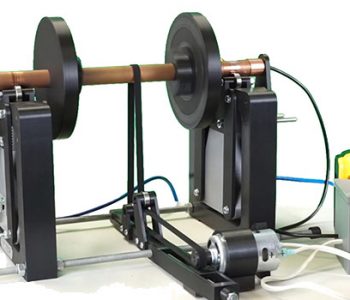
DIY Balancing Machine

Thanks to Denis you can build your own balancer and obtain a good balancing quality at a much lower cost. All the parts can be made with a 3D printer and with componets sourced in the market.

Technical Specifications

Capacity6 Kg (stand = 12 total)
Swing40 cm diameter
Rotor speedvariable (450 RPM minimum required)
Electrical12-24V
Device CommunicationWiFi
Software OSAndroid 7.0+

Build

Main components

  • Mechanical frame (STL Files for the 3D Printer available here)
  • HS-ACC WiFi accellerometer – 2 sensors version (electronic/sensing part)
  • HScope app (software part)

ISO G2.5 Balancing Demonstration

HScope Update 2024/2025

HScope Update 2024/2025

1. Cursors lock for Automotive tools

The cursors can be locked so once positioned they can be moved together.

2. Infinite mode for labels tool (Automotive tool) 

A new option allow to repeat the labels through the entire waveform.

3. Improved LIN Decoder

LIN decoder now integrate better stats and data report. Data can be exported.

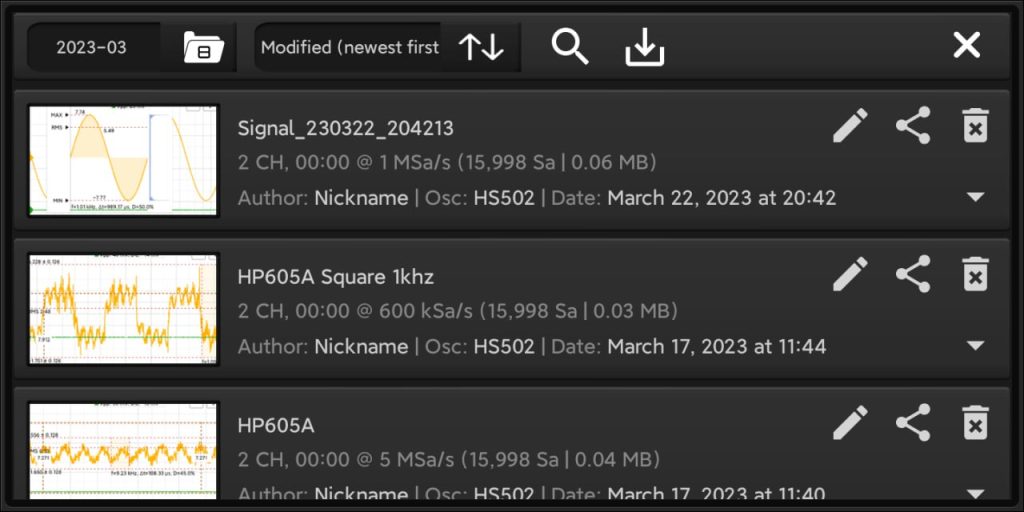
4. Waveforms search

You can search waveform by keywords.

5. 720 Tool Improvements

720 degrees tool has 2 middle cursors.

6. Load Waveform Improvements

Added Waveform title on the screen after Waveform loading.
7. New Leak Detector feature


Previous updates

HS-ACC Building Instructions

Required parts

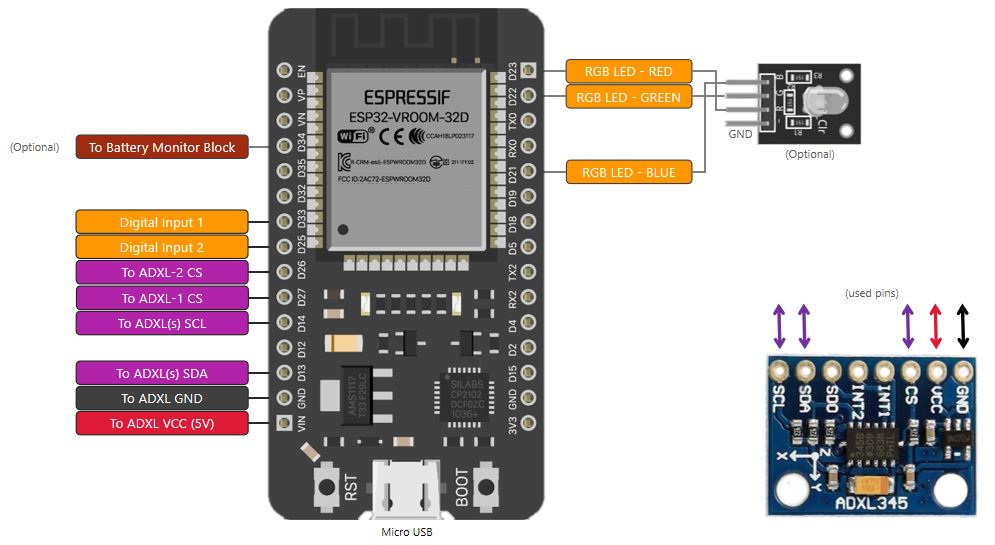
  • x1 ESP32-WROOM Development Board (with chip ESP32-WROOM-32 version 1 or up, or ESP32-WROOM-32D or ESP32-WROOM-32E)
  • x1 (or x2) ADXL345 Module
  • x1 RGB LED Module (optional)

Connections Schematic

Pinout

Sensor 1 (ADXL345) PinESP32 Pin
GNDGND
VCCVIN (5V)
CSD27 (IO27 or GPIO27)
SDA D13 (IO13 or GPIO13)
SCL D14 (IO14 or GPIO14)
Sensor 2 (ADXL345) PinESP32 Pin
GNDGND
VCCVIN (5V)
CSD26 (IO26 or GPIO26)
SDA D13 (IO13 or GPIO13)
SCL D14 (IO14 or GPIO14)

Long Wiring Setup

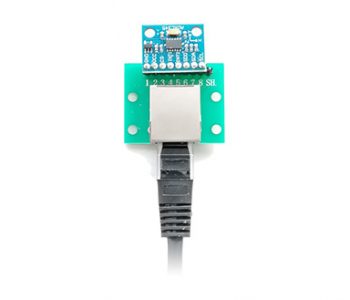
In case you need to use long wires for the sensors, it is suggested to use Ethernet cables for the connections. In addition you can use also a RJ45 Breakout Board as the following:
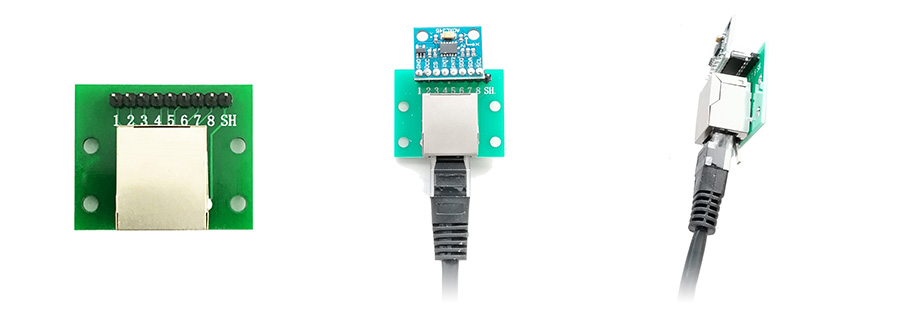
PCB Built

You can also build this device with the PCB you will find here which include:

  • PCB & Schematic for Main board for 1 or 2 sensors
  • PCB & Schematic for Sensor module
  • Components List


Automotive TEST PAGE

Automotive TEST PAGE

Title

Contentfsdf ds

f ds

ds

dsf

Loto OSCH02
Loto OSCH02

TItle 2

Testr sd sd fsd

TERMS AND CONDITIONS OF USE

TERMS AND CONDITIONS OF USE

Any person (user) accessing to Martinloren® websites or using HScope™ app is subject to, and agrees to, the terms and conditions set out in this legal notice. If the user does not wish to be bound by these terms and conditions, the user may not access, display, use or download and/or otherwise copy or distribute content obtained at these websites nor use the HScope™ app.

Use and copyright

Use of Martinloren® websites, and any related services, content or applications contained therein or offered thereon is at the sole risk of the user.

Users may view, copy, download to a local drive, print and distribute the content of this website, or any part thereof for non-commercial, informational or reference purposes only, unless explicit consent of the author.

Users may not cede, sub-license or otherwise transfer any rights they may have under these terms and conditions or which may otherwise have been obtained through the use of this site.

Users who wish to use content from this site for commercial purposes may only do so with the prior written permission obtained by sending an email to support@martinloren.com.

Any reproduction and/or copy of the content or portion thereof for commercial purposes must include the following copyright notice in its entirety

“© 2024 – Martinloren®. All rights reserved.”

All moral rights and any other rights of other legal entity in respect of which content is contained on this site not expressly granted, are reserved.

Data Ownership

The user agree to cede to Martinloren® cloud platform the right to use, maintain and redistribute the waveform data shared or uploaded to HScope™ Cloud service.

Intellectual property rights

All content, data and trademarks, including, but not limited to, software, technology, databases, know-how, text, graphics, icons, hyperlinks, private information, designs, program, publication, product, process, or idea described in this website may be the subject of other rights, including other intellectual property rights, which are the property of or licenced to Martinloren®.

Third party websites are welcome to link to the information that is hosted on these pages.

It is expressly prohibited for any person, business, entity or website to frame any page on this website, including the home page, in any way whatsoever, without the prior written approval of Martinloren®.

Amendments to content and information

The website owner expressly reserves the right in its sole discretion to affect any amendment or alteration to the content and information set out in this website.

Users acknowledge that it is their responsibility to familiarise themselves with any amendment or alteration affected.

Updating and maintenance of these Terms and Conditions of Use

Martinloren® reserves the right to modify, add to or remove from portions or the whole of these terms and conditions of use from time to time.

It is the user’s obligation to periodically check these terms and conditions of use at this website for updates.

The user’s continued use of Martinloren® websites, apps and services following the posting of pages or updates will be considered notice of the user’s acceptance to abide by and be bound by these terms and conditions of use, including such pages or updates.

Change Log – Archive

Change Log – Archive

2.4.0 (363) Dec, 2022

Implemented enhancements

  • Custom Channel Names can be imported from file
  • Channel Names and Probes are automatically imported when SET an existing working folder
  • Channels signal can be inverted with Filters (Update 2022/2023)
  • Can add pictures to the Waveform from the phone Gallery (Update 2022/2023)
  • Can delete pictures from the Waveforms (Update 2022/2023)
  • Add cursor stabilizer for 360/720 Automotive Tool
  • Possibility to set Automatic or Manual start for Automotive recording (Update 2022/2023)
  • Auto-Update Waveform list when the Document Folder is modified outside HScope (Update 2022/2023)
  • Digital Module can convert result of the Math Module to digital signal and process (i.e. for CAN)
  • Digital Module: improved analog to digital conversion
  • Improved PDF Report
  • Better control of 720/360 graph (measurement cursor has the priority over the side cursors)

Fixed bugs

  • Problems when using a device without Google Play
  • Crash for HS-ACC in some case
  • Filter let signal disappear in roll mode
  • Crash on set app folder
  • Waveform preview image did not refresh when overwrite waveform
  • Digital signals could not be loaded from saved waveform
  • Cloud ID could not be copied automatically from clipboard in some case
  • Bluetooth permissions on Android 12
  • Crash if selected the wrong documents folder
  • Overvoltage was not shown correctly
  • Crash with several dialogs
  • Bugs on Digital Module
  • PWM window could not resize correctly according menu width
  • Re-save waveform did not keep the photos

2.3.9 (346) Ago, 2022

Implemented enhancements

  • Automotive Module: is it possible to set the allocated RAM up to 2GB (Update 2021/22)
  • Enhanced Automotive Module performances.
  • Correct visualization of FPS statistic.
  • Enhanced freq function (Automotive module)
  • Automotive Module auto-zoom consider the actual data range (relative range for a better zoom)
  • Waveform explorer can load single files (HScope .zip format)
  • Enhanced white theme in Data Logger page
  • Normal Trigger allowed in Roll Mode (HS402 and Hantek 6074) (Update 2021/22)
  • Enhanced XY module: better auto-viewport, point measure, possibility to set V/div (Update 2021/22)
  • Avoid Labels overlap in Vertical Cursors
  • Labels on vertical cursors can be hidden in 100/360/720 deg. Tool
  • Automotive Module can export PDF Report (Update 2021/22)
  • Possibility to change Probes order (Update 2021/22)
  • Can open HScope ZIP files from other apps to HScope (Update 2021/22)
  • Improved DataLogger
  • Improved PDF Report with probes information and waveform author, channel coupling, filters, notes
  • Can import digital data from saved waveforms
  • Improved Probes Cloud Downloader to work also Offline
  • Improved Performances / Memory usage
  • Can add photos to the Waveforms files
  • Added support for Android 12
  • Added CAN Decoder (Digital Module)
  • Supported latest OWON 1022 hardware
  • Improve Math Demodulator to adapt automatically to the signal
  • Improved PDF Report
  • Added possibility to rename Channels
  • Automotive Channels can hide if not used
  • Channels can be hidden when load a waveform
  • Can trigger on Channel-3 & 4 in case Channels-1 and 2 are OFF

Fixed bugs

  • Fixed crashes on Automotive module due to lack of memory.
  • Fixed rates for Hantek 6074, crashes with roll mode trigger
  • Crash on too much memory allocated for Automotive Module
  • PDF Report export is not recognized in Google Drive
  • Load waveform button did not work in Data Logger page
  • Bug on XY Module – frequency relation data wrong in some case, graph Y unit wrong in some case, wrong data export, wrong thumbnail image
  • Wrong voltage selection on Channel 2 – Automotive Module
  • Crash in phones with limited RAM when they import waveforms generated with phones with larger RAM
  • XY Module: Delay computation run indefinitely also after module close
  • Wrong Labels position in Vertical Cursors with 2 channels
  • Imported waveform could not be filtered in Oscilloscope screen
  • Crash for Hantek iDSO1070
  • Voltmeter color error (stays always red after first time)
  • Fixed crash on Freq function (Automotive Module)
  • Fixed trigger on Channel-2
  • Flags could not be removed on new acquisition or file loading

2.3.8 (305) Apr, 2022

Implemented enhancements

  • New driver for Hantek DSO-2xx0 Oscilloscopes (DSO-2090, DSO-2150, DSO-2250)
  • Added Flag tool during Automotive recording (Update 2021/22, see guide for usage)
  • Notes content can be changed
  • Flags can be saved/loaded
  • 720 Degree Tool cursors can be moved also on the top part of the screen
  • Scroller Window is hidden during Automotive recording and then restored
  • Waveform position and zoom is saved and can be loaded
  • Turned OFF Channels get reduced in Oscilloscope mode
  • Voltage ranges for each channel is more “user friendly”
  • Voltmeter show Duty Cycle
  • White color scheme for Voltmeter
  • Enhanced 720 degrees graph
  • Enhanced Phosphor effect
  • Enhanced Cloud waveform sharing
  • Enhanced contrast in White UI for AC/DC/OFF buttons
  • New report created on screenshot for Oscilloscope screen (update 2021/22)
  • Enhanced notes tool (update 2021/22)

Fixed bugs

  • Issue on ON/OFF button for Math panel in Automotive module
  • Automotive Labels tool graph outside graph area
  • Horizonal Cursor values was not referred to the axis unit (did not scale)
  • Wrong visualization of Channel 4 panel in Automotive screen
  • Normal/Single Trigger did not work on ISDS205.
  • THD Processor remove DC component for more accurate result.

2.3.7 (291) Oct, 2021

Implemented enhancements

  • Possibility to set Waveform name upon Save
  • Audio Module can import WAV files (Update 2021)
  • Added the THD calculator in the Audio Module (Update 2021)
  • Added 0-100% vertical cursors
  • Math Module output display some known units as result of the operation (Watt, Ohm)
  • Added Time column in CVS Export
  • Added BandPass and BandStop Filters
  • Better text input dialog (for file names and other)
  • Hantek 6022 (BE/BL) added hardware option for AC Coupling
  • Waveform scroller can be zoomed with fingers. Added position of cursors and tools.
  • Improved digital module
  • Digital data can be saved / loaded together with analog data
  • CSV can exports up to 4 channels data
  • Added dialog to confirm file deletion
  • Automotive module can record digital data
  • Audio module allow to use microphone to acquire data
  • Hantek 6074 real-time rate up to 125KSa/s with 4 channels
  • Hantek 6074 supports Audio Output
  • Improved Auto Voltage function
  • Optimized freq() function (Math Module)
  • Better arrangement for Probes on Cloud

Fixed bugs

  • Crash on file export in other formats (XML, CSV, WAV)
  • Crash on folder import on Android 8
  • White color for PWM Module
  • Font size in logger graph
  • Crash in case load a waveform just with second channel
  • Crash on save waveform after loading
  • AUTO Voltage did not work with FX2 Experimental Mode
  • Hantek 6074 input voltage wrong when enable channel
  • Channel 4 voltage selector did not show correctly
  • Autoscroll in Automotive Module

2.3.6 (274) Sep, 2021

Implemented enhancements

  • 360′ Tool show also RPM information
  • Added 1 decimal to Duty Cycle value
  • iDSO1070 added lower rates (slow rates, 1, 2, 5KSa/s)
  • Waveform Explorer can zoom the thumbnails (Update 2021)
  • Automotive Module shows units for loaded waveforms

Fixed bugs

  • Waveform loading did not remove previous tools on the screen
  • Wrong data read for old saved waveform (2019)
  • Vertical cursors cannot be used on loaded waveforms
  • Visualization error in statistic (of second type)
  • Horizontal cursors did not move in FFT
  • Crash in Automotive module (in some case)
  • Automotive module did not show Channel-4
  • Color error in 360 and 720 Tools
  • XY Plot button not enabled
  • Saved files did not show in Data Logger
  • Automotive Module saved empty files from second save
  • Data logger could not open saved CSV for some locale

2.3.6 (269) Aug, 2021

Implemented enhancements

  • Added Math computation to Automotive Module (Update 2021)
  • Automotive Module allow to set zero offset before recording starts (Update 2021)
  • Added 4 Channels support for Hantek 6074
  • Added support for new HS-ACC WiFi Accellerometer
  • Added 360° Automotive Tool
  • Enhanced Automotive Label Tool
  • Improved Automotive Fire Order Tool
  • Menu size can be configured (both Oscilloscope and Automotive screens)
  • White UI (both Oscilloscope and Automotive screens) (Update 2021)
  • Added filter buttons in Automotive menu
  • Show distance among 3 horizontal cursors
  • Interface buttons hidden when take screenshot
  • Improved load/save data speed
  • Channels can have arbitrary names (according hardware)
  • Added info on the memory available for the app (in Settings->System. Device dependant)
  • Don’t need DEMO mode to open and process saved waveforms
  • File explored detect correct file versioning

Fixed bugs

  • Document folder link loose on phone reboot
  • DSP Filter error at the beginning of the Waveform
  • Save calibration data crash on Android < 10
  • Waveform align buttons didn’t work when Math module is enabled with just 1 channel
  • Filters and Math operations can be applied just 1 time in Automotive Module
  • Crash due to lack of memory in Automotive Module
  • PSO2020 wrong hardware settings when connected the device
  • Crash on Automotive module new Zero Offset feature
  • Cloud Download did not save file in Public Folder

2.3.5 (245) Jun, 2021

Implemented enhancements

  • HS402-Wifi DIY Oscilloscope driver – faster WiFi connection
  • Added support for Android 11 (new file management)
  • Screenshot on the voltmeter screen take all the controls
  • Added Gravity unit (G) for accelerometer sensors

Fixed bugs

  • Calibration Multiplier crash for OFF channels
  • Calibration error for HT1008
  • Wrong number of samples for HT1008
  • Crash on file delete (new file management Android 10+)
  • Data Logger wrong MAX and MIN values in some case

2.3.4 (235) Apr, 2021

Implemented enhancements

  • HS10X supports PWM output (it requires Firmware v10.2)
  • HS402-Wifi DIY Oscilloscope driver
  • Data can be exported also from XY Module.
  • XY Module can show also data saved.
  • Improved Labels Tool buttons
  • Improved Settings screen, added a specific section for Oscilloscope settings
  • Improved Vertical Cursors & disable Auto Vertical Cursors
  • Extended export capabilities of the CSV format up to 1ML samples (old license owners requires Update 2020)
  • Faster UI coloring for channels
  • Added Cloud sharing for saved Waveforms, improved Cloud Waveform Downloader
  • Improved visibility of values on the Vertical Cursor
  • Bigger buttons, enlarged Settings menu and texts for Tablets
  • FFT allow to select the active channel, UI updated
  • Math integrate new Demodulation function (for low frequency, eg. vibration sensor)
  • Added statistics for 2 Vertical Sensors
  • Added Harmonic Cursors for FFT Vertical Ruler

Fixed bugs

  • DUAL mode not working for HS10X
  • Bug on duty cycle
  • Bugs with Automotive Module (wrong scaling, crashes,…)
  • FPS did not show after next app openings
  • Block on HS402 WiFi if it starts with DEMO running
  • HS402 annotation for current adc resolution (HD512, HD1024,…)
  • Crash on Automotive Labels Tool if selected labels < 2
  • Crash on Automotive Tools (if opened many times)
  • Data Logger wrongly ask license when try to open files
  • Wrong event management on channels graph lead to errors
  • Wrong values for Horizontal Cursor in second scale
  • Fixed FX2 Experimental Mode for Loto OSCA02 and OSC802
  • Fixed wrong text position on the vertical cursors
  • Could not click on + button after enabling the Automotive Labels tool
  • Wrong button size in automotive tools (Labels and Fire Order tools) after change font size
  • XY Graph size issues for big screens (eg. Tablets)
  • Horizontal Cursor alarm icon disappear after click
  • FFT disappear in some case, UI issues.

2.3.2 (211) Jan, 2021

Implemented enhancements

  • Implemented 4 Channels management (Oscilloscope Mode, Automotive Module, Import/Export)
  • Updated Automotive Module UI
  • Hantek 1008 support 4 channels (old license owners requires Update 2020)
  • Improved 720 Degree Automotive tool
  • Improved XY Module (old license owners requires Update 2020)
  • Improved HS402 driver (real-time rate)
  • Math module signal can be moved in the screen
  • Signals can show infinity values (due to operations with Math module)
  • Increase channel modification timeout to 3secs.
  • Improved axis labels

Fixed bugs

  • Fixed bug on crash when probe deleted
  • Fixed wrong scaled when resize channel
  • Fixed Math module doesn’t show
  • Fixed crash on Math module if used with other 4 channels active
  • Fixed voltage spinner on probe change
  • Fixed bug on Hantek 1008 crash

2.3.1 (201) Dec, 2020

Implemented enhancements

  • Shadow behind horizontal cursors differential value (when have 2 cursors)
  • Set maximum Automotive Module recording length according Android device memory.

Fixed bugs

  • Fixed bug on statistics for Channel 1
  • Fixed bug on user statistics option
  • Fixed wrong signal visualization when channel 2 is not 1:1 ratio with channel 1.
  • Fixed alarm for horizontal cursor.
  • Fixed bug on voltage selector for HS402 PRO
  • Fixed crash on tap 3 fingers on the screen

2.3.0 (197) Oct, 2020

Implemented enhancements

  • Added handle also for Channel 1
  • New Instrustar ISDS210 Driver
  • New PWM Module for HS402, Hantek 6022, Loto 482, Instrustar ISDS205
  • DSP Filters works also in Automotive Module
  • Automotive labels tool repeat the first label again at the end of the sequence, improved visibility
  • Settings shows Bluetooth paired and discovered devices
  • Calibration panel shows the actual voltage ranges for the oscilloscope
  • It is possible to save/load calibration data on/from file.
  • Disabled Automotive Tools in FFT graph (not usable)
  • Redesigned cut function in vertical cursors (automotive module)
  • Horizontal cursor can be moved also on second scale
  • Channel-2 signal can be scaled independently from channel-1
  • Added Alarm Cursor (for horizontal cursors, available in 2020 Update)
  • Supported new Loto OSCA02 and Loto OSC802 (input range up to 10Vp).

Fixed bugs

  • Fixed crash in License page and FFT peak-hold
  • Fixed bug on FFT peak-hold switch
  • Fixed bug on HS101 AC/DC selector for some phone
  • Fixed bug on HS10X / HS402 for AC/DC selector if related hardware was not implemented
  • Fixed bug on system crash
  • Fixed wrong measure on 2V range for HS402
  • Fixed bug on HS101-BLT not recognized in some model of phones with Android 10
  • HS402 input button settings didn’t work (requires HS402 firmware 1.5)
  • Corrected error on vertical cursor when channel-2 scale is different from channel-1
  • Vertical cursors can now be moved when in proximity of channel-2 cursor

2.2.9 (182) Jul, 2020

Implemented enhancements

  • Added link to the change log in the Info Page
  • Horizontal Cursors works also on the Second Scale
  • Automotive Module supports Second Scale on the right
  • Duty cycle, RMS values more stable
  • Added histogram in the statistics (only from update 2020)
  • Added FFT – Max Peak mode

Fixed bugs

  • HS402 driver improved stability
  • Fixed wrong menu size in Automotive module at startup without any oscilloscope connected.
  • Fixed wrong channel 2 color in Settings
  • Fixed Second Scale visualization issue in some case
  • Probe selector could not show all probes in some case (next release)
  • Corrected FFT bug did not show in particular conditions
  • Fixed channel number in filter (wrong name only)
  • Fixed crash on load automotive files inside oscilloscope screen
  • Fixed FFT peak-hold function
  • Fixed FFT did not show on loaded files

2.2.8 (179) Jun, 2020

Implemented enhancements

  • Improved user interface (added shadows, right panels color according channel colors)
  • Second scale on the right in Oscilloscope screen
  • Added channels units information in Data Logger exported CSV
  • Added freq() function in Math Module (BETA)

Fixed bugs

  • HS402 driver works for Android SDK < 9
  • HS102 channel 2 AC/DC selector didn’t get right settings on startup
  • Fixed wrong channel names on UI channels panels

2.2.7 (177) Jun, 2020

Implemented enhancements

  • New WAV format exporter
  • Changed overscale visualization method
  • Math channel color is configurable
  • Added fullscreen mode for Data Logger
  • Data Logger can load saved or modified CSV files

Fixed bugs

  • Corrected bug on statistics on HS402 (when use only CH-2)
  • Corrected max range data in oscilloscope mode
  • Corrected wave color for Math channel
  • Corrected waves color when load a file in oscilloscope mode

2.2.7 (176) May, 2020

Implemented enhancements

  • 720° Overlay allow movable cursor to measure over the area
  • Folder structure is created as user authorize permissions
  • Automotive Label Tool allow up to 12 cylinders
  • Voltage change now disable the AUTO voltage mode
  • Scroll can go over signal end
  • New Duty Cycle calculation algorithm
  • New DSP Filters
  • New HS402 DIY Oscilloscope Driver
  • Added new probe units: kPa, mb
  • Added probes offset auto calibration option
  • UI updated in some part
  • Automotive module menu can be hidden
  • Trigger is more easy to be moved on high-resolution screens
  • New Digital Module available for tests
  • Updated calibration module, calibration multiplier reset just interested voltage ranges)
  • Avoided memory leak in Cypress FX2 Experimental mode
  • New Cylinder Sincronization Overlay (Automotive Module)
  • Added color settings and thickness for waves
  • Updated drivers: HS10X, Loto OSCA02 (support for FX2 Experimental Mode)
  • Automotive module support recording cut
  • Added WAV format exporter (next release)

Fixed bugs

  • Fixed samples error on OSCA02/OSC2002
  • Fixed crash on Data Logger – Channel 2
  • Fixed UI error on Data Logger
  • Fixed Hantek 1008 data retrieving in Normal Trigger Mode (not it read the full buffer)
  • Fixed Probes update on change
  • Fixed bug on Settings -> Samples Interpolation
  • Fixed calibration issue for Loto OSC (all) in some case
  • Fixed Overscale issue on Probes with negative multiplier
  • Fixed new Probes issue (could not use after creation)
  • Fixed crash on Loto OSC on first run
  • Corrected calibration issue on multiplier
  • Calibration forms are now visible on medium resolution devices (small screens)
  • Fixed default device OSC482 among DDS120 and OSC482

2.2.6 (166) Mar, 2020

Implemented enhancements

  • Oscilloscope allow data import/export
  • Created new folders to keep saved files: Screenshots folder and Scope folder
  • Automotive Module support auto scroll according finger swipe (just after recording finished for data analyse)
  • FFT is now among the Modules
  • Trigger design updated
  • Hantek iDSO1070 can configure IP address in the settings
  • New Horizontal Cursors & Labels Overlay
  • Improved Vertical Cursors
  • Improved Logger
  • Added Driver for Loto OSCA02 and Loto OSC2002 (2019 Edition)
  • Improved Info panel (added Device name)
  • Labels can be exported/imported
  • Improved main view / added buttons with menu
  • Double click activate screen auto resize

Fixed bugs

  • Fixed crash or freeze on Automotive Module data import
  • Fixed Normal and Single Trigger issue on HS10X for rate <=100KSa/s (not roll mode)
  • Fixed issue on the original Brightness restore
  • Fixed visualization for waveform generated by Math Module
  • Fixed first sample error on OSC802 and OSCA02

2.2.5 (157) Feb, 2020

Implemented enhancements

  • Hantek 1008 added rate: 9KS/s
  • Duty Cycle calculator allow up to 5% tollerance on the requirement to have minumum value = 0V
  • Better file manager for Automotive Module
  • File Manager export also in CSV and XML formats
  • Automotive Module allow to import and analyze waveforms without requiring the license
  • Better auto-scrolling during Automotive Module recording
  • Better design for menu in Voltmeter / Datalogger panel
  • Channel 2 indicator moved on the left in Automotive Module
  • Better colors for waveforms in Automotive Module
  • File preview in Automotive module now uses 16:9 format
  • Old DDS120 must be configured first time in the Settings. See here
  • Supported new SainSmart DS482. See here

Fixed bugs

  • Hantek 1008 Fixed single trigger for lower rates (18 and 38 KSa/s)
  • Statistics corrected in Single Trigger Mode.
  • Fixed issue while operate 1-2-3 Label Tool in Automotive Module
  • Fixed fields size in Settings -> Probe panel
  • Automotive Module show correclty data units after import.
  • Automotive Module before set the Coupling to DC, now it keep AC or DC according to oscilloscope previous settings.

2.2.4 (154) Jan, 2020

Implemented enhancements

  • New Loto OSC802 Driver
  • Added optional scroller for Oscilloscope and FFT screens
  • More stable FFT statistics
  • Added auto-resize button for FFT
  • Improved Bluetooth connections management. Now you can pair several HS101 BLT oscilloscopes, then HScope connect just to the active one.
  • Automotive Data can be exported from low memory devices (before it crashed)
  • Improved Automotive scroller
  • Automotive Module export data in a new optimized and fast format (.hxml)
  • Automotive module can load and show saved waveforms (can load old and new format files)
  • Automotive new file format support waveform preview

Fixed bugs

  • Automotive Module produced corrupter samples on start (on first chunk)
  • Automotive Module fixed incorrect view size in some cases
  • Automotive Module could not enable channel after disable for 1 Channel Oscilloscopes (ie. HS101)
  • Fixed bug on iDSO1070, just 1 IP allowed for router mode (check device guide)
  • Fixed Time/Div selector in Oscilloscope
Martinloren